Welcome toOur Blog
-
 Back
How to Create a Comfortable Work-From-PG Setup in a Shared Room
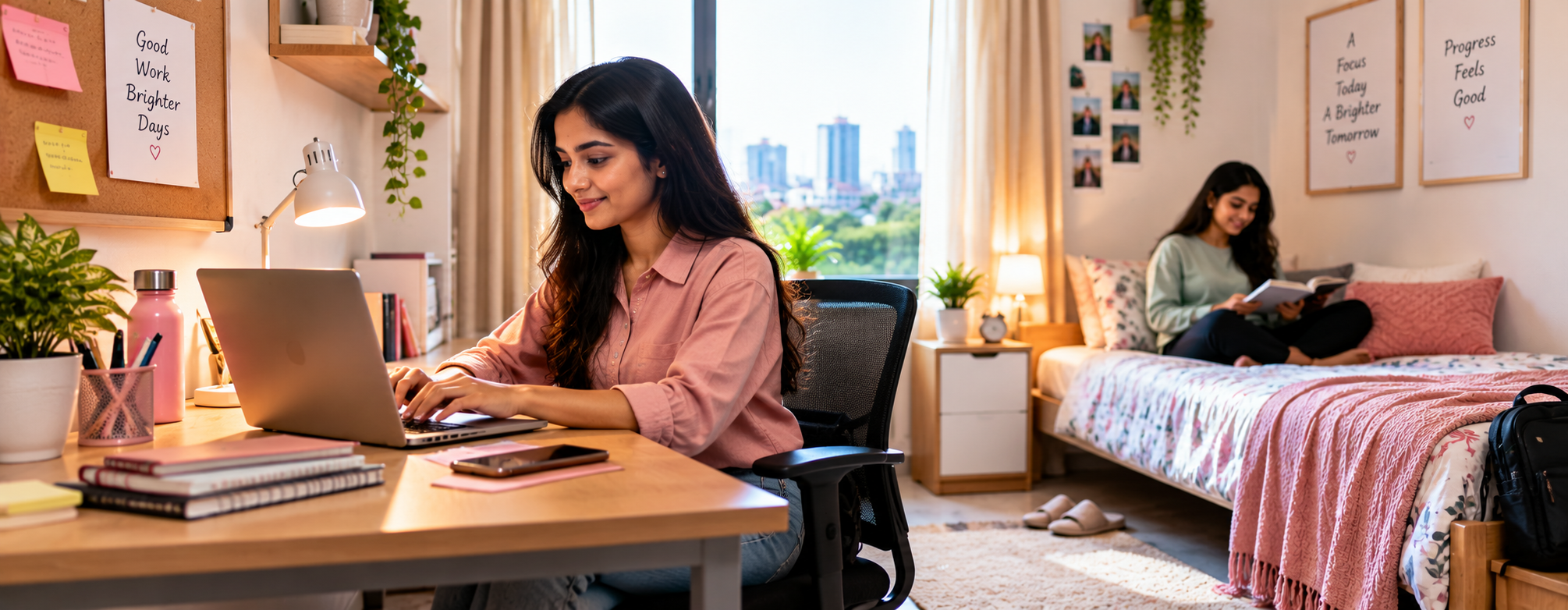
Working from home has become a familiar part of professional life, but what happens when your home is a shared PG room? For women living in Hyderabad, balancing office responsibilities with shared accommodation can sometimes require a little extra planning.
Unlike a dedicated home office, a PG room serves multiple purposes. It is where you sleep, relax, organise your belongings and spend personal time. When you also need to attend online meetings, complete assignments or work remotely, creating a comfortable workspace becomes important.
The good news is that you do not need a separate room or expensive furniture to create a practical work environment. With thoughtful organisation, suitable lighting and a few simple adjustments, you can make your shared PG room more suitable for productive work.
Here are some useful ways to create a comfortable work-from-PG setup without compromising your personal space or disturbing your roommate.
1. Choose a Dedicated Corner for Work
One of the first steps towards creating a comfortable workspace is identifying a suitable spot in your room.
If your PG room has a study table, consider using it as your primary working area. Otherwise, look for a stable surface where you can comfortably place your laptop and other essentials.
Try to choose a location that allows you to concentrate without blocking your roommate's movement.
A dedicated workspace can also help you mentally separate professional responsibilities from personal time.
Even a small, organised corner can make a difference when you spend several hours working on a laptop.
2. Make Your Seating Arrangement Comfortable
Working for long hours while sitting on a bed may seem convenient initially, but it can become uncomfortable over time.
Whenever possible, use a chair and table that allow you to maintain a relaxed, supported sitting position.
Keep your feet supported, avoid leaning forward continuously and position your laptop screen at a comfortable viewing height.
If you use your laptop for extended periods, a separate keyboard and mouse can make your setup more comfortable, particularly when the laptop is raised.
Take short breaks to stand, stretch and move around instead of remaining in the same position throughout the day.
3. Use Natural Lighting Whenever Possible
Lighting can influence how comfortable your workspace feels throughout the day.
If your room has a window, consider positioning your work area where you can benefit from natural light without direct glare falling on your laptop screen.
Avoid placing your screen directly in front of a bright window if it makes viewing difficult.
For evening work, a compact desk lamp can provide focused lighting without illuminating the entire room.
This becomes particularly useful when your roommate wants to rest while you still have pending office work.
4. Keep Your Work Essentials Within Reach
A shared PG room may not offer unlimited storage, making organisation especially important.
Keep frequently used items such as your laptop charger, notebook, pens, earphones, mouse and office ID in one designated place.
A small organiser, storage pouch or desk tray can help prevent these items from spreading across the room.
You can also use a separate bag for work-related accessories, making it easier to switch between office days and remote-working days.
The aim is to create a workspace that is easy to set up and equally easy to clear after work.
5. Use Headphones for Online Meetings
Online meetings are a regular part of remote work, but they can become challenging when you share a room.
Using headphones or earphones with a microphone can help reduce disturbance to your roommate and improve communication during calls.
Before joining an important meeting, check your microphone and internet connection.
If your work involves frequent meetings, discuss your usual meeting schedule with your roommate so both of you can plan around it where possible.
For confidential discussions, use a suitable private location rather than assuming that headphones alone will protect the conversation.
6. Create a Simple Background for Video Calls
A professional-looking video-call background does not require expensive decoration.
Choose a position where the background appears neat and free from unnecessary distractions.
A plain wall, closed wardrobe or organised section of the room can work well.
Before attending an important meeting, check the camera angle and ensure that your roommate's personal belongings are not visible.
You can also use a virtual background or background blur if your meeting platform supports it.
This helps maintain a professional appearance while respecting the privacy of others sharing the room.
7. Manage Noise Without Disturbing Your Roommate
Shared accommodation naturally involves everyday sounds.
Your roommate may be getting ready for work, speaking with family or following a different daily schedule while you are working.
Instead of expecting complete silence throughout the day, discuss your important working hours and meetings in advance.
Consider using headphones, muting your microphone when you are not speaking and choosing quieter periods for tasks that require concentration.
Mutual understanding can make shared-room working more comfortable for everyone.
8. Check Your Internet Connectivity Before Important Work
Reliable internet access is important when attending online meetings, uploading files or working with cloud-based applications.
Before starting an important task, check whether your connection is stable enough for the work you need to complete.
If your PG provides Wi-Fi, understand the available network arrangements and whether connectivity is consistent in your room.
Keeping a mobile data connection available as a backup may also be helpful when your work depends heavily on internet access.
Avoid waiting until the beginning of an important meeting to discover a connectivity problem.
9. Keep Charging Cables and Electronics Organised
Laptop chargers, phone cables, earphones and other electronic accessories can quickly create clutter in a small workspace.
Use cable organisers or reusable ties to keep wires together.
Avoid running cables across walking areas where someone might trip over them.
Do not overload electrical sockets or cover charging devices with bedding or clothes.
When you finish working, disconnect equipment that does not need to remain plugged in and return accessories to their designated storage space.
A tidy setup can help keep your shared room more comfortable and practical.
10. Respect Your Roommate's Personal Space
One of the most important aspects of working from a shared PG room is understanding that the space belongs to more than one person.
Your roommate may need to rest, study, get ready for work or spend personal time in the room.
Discuss your work schedule openly, particularly if you have early morning or late evening meetings.
Avoid placing work materials on your roommate's bed, desk or storage area without permission.
If your work requires frequent calls, consider whether an alternative suitable space is available for certain meetings.
Small adjustments and clear communication can help prevent unnecessary disagreements.
11. Separate Working Hours From Personal Time
When your workspace and sleeping area are in the same room, it can become difficult to switch off after work.
You may find yourself checking emails while relaxing or continuing office tasks beyond your usual schedule.
Try to establish a clear beginning and end to your working day.
Once your work is complete, close your laptop, put away your accessories and clear your workspace.
This simple routine can help create a distinction between professional responsibilities and personal relaxation.
Your PG room should remain a place where you can comfortably unwind after a busy day.
12. Keep Your Work Setup Flexible
Not every day will involve the same type of work.
Some days may include several video meetings, while others may involve independent tasks, reading or preparing reports.
A flexible setup allows you to adjust your workspace according to your schedule.
For example, you may need a laptop stand and headphones during meetings but only a notebook and laptop for routine tasks.
Choose accessories that are easy to move, store and maintain rather than filling your room with unnecessary equipment.
This is particularly useful when sharing accommodation with another resident.
What Should You Check Before Choosing a PG for Remote Work?
If you regularly work from home or follow a hybrid working schedule, consider how suitable the accommodation is for your professional requirements.
Before finalising a women's PG in Hyderabad, check the following:
-
Internet connectivity: Ask about Wi-Fi availability and test connectivity where possible.
-
Room arrangement: Understand whether there is sufficient space for a laptop and work essentials.
-
Lighting and ventilation: Look for a comfortable environment suitable for daytime work.
-
Power backup: Ask about electricity backup arrangements and any limitations.
-
Room occupancy: Consider how sharing arrangements may affect online meetings.
-
Noise levels: Understand the general atmosphere during your usual working hours.
-
Common areas: Check whether any appropriate spaces are available for occasional work.
-
Location: Consider commuting convenience for days when you need to visit the office.
These practical details can help you choose accommodation that supports both your professional schedule and personal comfort.
Finding a Balance Between Work and PG Life in Hyderabad
For many working women, Hyderabad offers opportunities across IT, technology, business and other professional sectors.
Areas such as Madhapur and HITEC City are associated with major employment hubs, making nearby accommodation an important consideration for professionals who need to travel to the office regularly.
If you follow a hybrid work schedule, your accommodation needs to support two different routines: travelling to the workplace and completing professional tasks from your room.
Choosing a conveniently located women's PG in Hyderabad can help you establish a routine that accommodates both.
At Sai Grand Women's PG, women looking for accommodation in Hyderabad can explore their stay options and enquire about facilities relevant to their everyday requirements.
Before booking, confirm the current room arrangements, internet facilities and other amenities to ensure they match your working needs.
Final Thoughts
Creating a comfortable work-from-PG setup does not require a large room or a separate home office.
A well-organised corner, comfortable seating, suitable lighting, reliable connectivity and thoughtful communication with your roommate can make remote working more manageable.
The most effective workspace is one that allows you to complete your professional responsibilities while maintaining a comfortable shared living environment.
By making small adjustments and respecting personal boundaries, you can create a practical balance between work, rest and everyday PG life.
For women balancing professional commitments and independent living in Hyderabad, finding accommodation that supports their routine is an important step towards a more comfortable lifestyle.
-


